.. another 5 hours and I fixed it.
Fixed Issue
I can now hear and chat in game on W10 PC after a few weeks of being sporadic at best.
Method - Thermonuclear
Reason - Too many variables. Work VPN and NordVPN may have screwed up something in a registry entry. I know a few drivers will screw up Teredo and possibly ferryman it for good even with fiddling.
Please ask your parents permission or help with ANY of this. Please do this at your own risk. Its basic stuff, but if you forgot to back up grandmas photos, youre going to get a world of hurt.
PC Prep
Note: SoT pirate Data is in Microsoft Cloud, no file backup needed. Just remember your login.
-Reinstall Windows 10 w/ a USB Win10 Boot Device (or in windows use the Reset Option. Open settings and in the search bar type "Reset This PC". Click 'Get Started' Select "Remove Everything". On the next popup after 'remove everything' , if you have multiple drives, make sure it reads something similar to 'remove windows from only the disk drive its on'.
Once on Fresh Install of W10
-Reinstall all Drivers from MB Manufacturer, Video Card, etc, etc.. Do not rely on windows auto driver search.
-Run Windows Update
-Install W10 Updates and let it restart
-Check for updates again
Install Basic Programs:
-Chrome
-Xbox Apps from Microsoft Store
(Do not download/install SoT yet)
Windows Headphone and Mic Settings
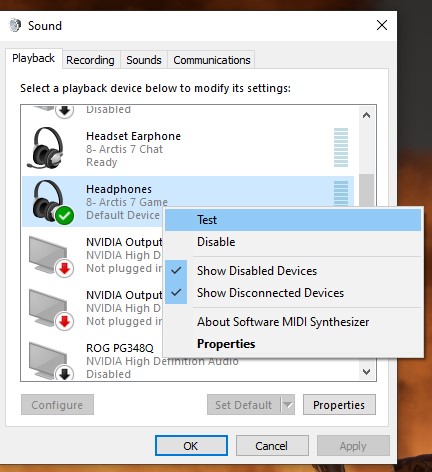
-Microphone (My headphones are Steel Series Artic 7. I installed its own program for its use. This headset has 2 Output Channels for isolation on the device itself. A wheel to control game sound vs discord chat)
Go to your sound settings control panel (see photos)
-Default Device (right click on headset) set to your main headphones
-Default Communication (right click on 'chat' headset) set to your chat headphones. If same as your main headphones, thats ok. Set it to the same as previously for Default Device
-SOT doesnt seperate the game audio from game chat audio. So you can set to which ever is needed in other program such as discord.
Router
All routers are different. Im running an NetGear Orbi.
-UPnP Option in Router Enabled
-No Port forwarding (UPnP Renders this redundant).
-Leave UPnP Hop and Advertise at default
-IPV6 is on "Auto Detect". This was on for other uses not related to SoT. You probably dont need this as Teredo runs IPV6 info through your already basic IPV4. As the reason for the Teredo, its converts the traffic for you.
Install SoT
-Start your download/install of the game.
-Restart your computer
-Once restarted go into Settings - Gaming - (left side) Xbox Networking
(if you receive an Teredo Error WHICH I DID GET FIRST ATTEMPT. Click the fix button below. In theory this will trigger your UPnP by refreshing your system. It should look similar as photo. This gave me an Open and Connected.
NOTE: I do not have any Teredo driver or the such in my Device Manager. This is ok. I worked for 3 hours looking for a solution and the device not being able to be added. Aslong as you can open up a command prompt (cmd or powershell) and type in:
ipconfig /all
and see "Tunnel adapter Teredo Tunneling Pseudo-Interface"
You should be good.
If for whatever reason youre still getting a teredo error. See whats going on. Go here and attempt Solution 3: https://support.xbox.com/help/Hardware-Network/connect-network/troubleshoot-party-chat
In CMD or powershell (as elevated/admin) type in:
netsh interface Teredo show state
You should see the same setup as below (possibly the server name and type may be different)
Open the SoT Game and wait for it to ask if its ok to use your Microphone. Hit YES or OK and minimize after this prompt.
Go to your App Volume and Device Preferences from the (windows: settings - system - sound. Scroll down and click on "App Volume and Device Preferences".
Make sure SoT is set to default (aslong as you did the earlier setup and made those devices default).
The above steps are exactly what I did to get this to work. I didnt have to go into any other setting or remove anything from device manager. Go into Privacy settings in the xbox app. The only privacy setting you need is the one on the Xbox website that says you can chat with other people, which you probably already did. Everything else is set from the go with a fresh windows install.